

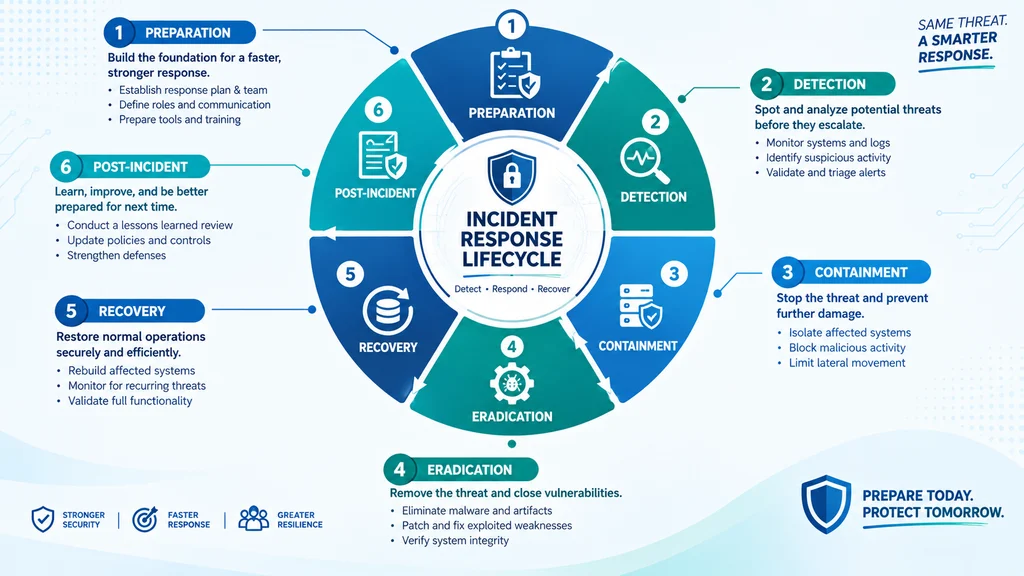
The best incident response and recovery strategies follow a structured lifecycle: preparation, detection and analysis, containment, eradication, recovery, and post-incident review. This framework minimizes damage and restores operations fast. Top alternatives: NIST SP 800-61 lifecycle, CISA playbooks, business continuity alignment, disaster recovery integration, and tabletop-tested protocols.
Your phone buzzes at 3 AM. The SOC is reporting unusual outbound traffic. Your heart drops because you know what this could mean. A breach. Ransomware. Data exfiltration. The next few hours will determine whether this is a manageable disruption or a business-ending catastrophe.
Incident response and recovery isn’t just about having a plan on paper. It’s about having a tested, battle-ready playbook that your team can execute under pressure when every second counts. Whether you’re a small business owner, an IT manager, or a security professional, understanding the full lifecycle of incident response can mean the difference between a quick recovery and a devastating loss.
The truth is, most organizations freeze when an incident hits. They waste precious hours figuring out who’s in charge and what to do next. That’s why we’ve put together this complete guide covering 200+ strategies, responses, and frameworks for incident response and recovery.
Preparation Strategies
1. Establish a formal incident response policy
Example: Use this as your foundational document that defines what constitutes an incident and triggers a response.
Meaning: Clear definitions prevent confusion and ensure consistent action during crises .
2. Name an incident commander with backup authority
Example: Use this when designating who can make containment decisions like disconnecting systems.
Meaning: A single decision-maker speeds up response and reduces chaos .
3. Build a communication tree with after-hours contacts
Example: Use this to ensure employees hear from designated contacts before rumors spread.
Meaning: Pre-planned communication prevents information vacuums .
4. Pre-engage a digital forensics and incident response firm
Example: Use this before an incident occurs so you’re not Googling vendors at 3 AM.
Meaning: Pre-vetted partners respond faster and maintain insurance coverage .
5. Maintain a current inventory of critical systems and data
Example: Use this to know exactly what you’re protecting and where sensitive data lives.
Meaning: You can’t protect or report on what you haven’t mapped .
6. Create and test isolated backup procedures
Example: Use this to ensure backups can’t be encrypted by ransomware.
Meaning: Isolated backups are your recovery lifeline .
7. Develop a “jump kit” with clean laptops and forensic tools
Example: Use this when your primary network is compromised and you need clean equipment.
Meaning: Pre-staged resources eliminate procurement delays during crises .
8. Establish baseline network and system behavior
Example: Use this to identify anomalies that signal an incident.
Meaning: Understanding “normal” makes “abnormal” visible .
9. Document legal notification obligations for all jurisdictions
Example: Use this to understand breach reporting deadlines before you need them.
Meaning: Regulatory clocks start immediately and ignorance isn’t a defense .
10. Create a break-glass contact list including legal and law enforcement
Example: Use this when you need external expertise immediately.
Meaning: Ready contacts eliminate time-wasting searches .
11. Define incident severity levels with clear escalation paths
Example: Use this to determine response intensity based on impact.
Meaning: Not every glitch requires the same response .
12. Conduct regular tabletop exercises with all stakeholders
Example: Use this to practice response under realistic pressure.
Meaning: Untested plans fail when it matters most .
Detection and Analysis Responses
1. Establish 24/7 monitoring with automated alerting
Example: Use this to catch anomalies outside business hours.
Meaning: Attacks don’t wait for business hours .
2. Triage alerts to filter false positives from real incidents
Example: Use this when alert volume threatens to overwhelm your team.
Meaning: Effective triage prevents alert fatigue .
3. Use indicators of compromise to identify active threats
Example: Use this when you suspect a breach but need confirmation.
Meaning: IOCs provide concrete evidence of malicious activity .
4. Correlate signals across multiple data sources
Example: Use this when individual logs don’t tell the full story.
Meaning: Cross-referencing reveals patterns invisible in isolation .
5. Validate incidents before initiating full response
Example: Use this to avoid overreacting to benign events.
Meaning: Confirmation prevents wasted resources on non-incidents .
6. Document every detection decision in a timestamped log
Example: Use this to create an auditable record of your response.
Meaning: Decision logs become legal documents during investigations .
7. Analyze attacker tactics, techniques, and procedures
Example: Use this to understand what you’re dealing with.
Meaning: TTP analysis informs containment strategy .
8. Determine the scope of compromise immediately
Example: Use this to understand how far the attacker has spread.
Meaning: Scope determines containment urgency .
9. Identify the initial infection vector
Example: Use this to prevent reinfection during recovery.
Meaning: Understanding entry points closes gaps .
10. Assess data exfiltration risk with network analysis
Example: Use this when sensitive data may be leaving your network.
Meaning: Exfiltration changes the incident’s severity dramatically .
11. Use threat intelligence to contextualize findings
Example: Use this to match your observations against known threat actors.
Meaning: Intelligence accelerates understanding .
12. Communicate detection findings to the response team
Example: Use this to mobilize response actions quickly.
Meaning: Timely information sharing saves critical minutes .
Containment Responses
1. Isolate affected systems from the network immediately
Example: Use this when you’ve confirmed an active threat.
Meaning: Isolation prevents lateral movement and further damage .
2. Disable compromised accounts across all systems
Example: Use this when credentials have been stolen or misused.
Meaning: Account disabling cuts off attacker access .
3. Rotate passwords for all potentially affected accounts
Example: Use this as a precaution even if you’re unsure which accounts were accessed.
Meaning: Credential rotation prevents ongoing unauthorized access .
4. Enforce MFA on all critical systems immediately
Example: Use this when legacy accounts without MFA are exposed as vulnerabilities.
Meaning: MFA blocks many credential-based attacks .
5. Block suspicious IP addresses and geolocations
Example: Use this when you’ve identified attacker infrastructure.
Meaning: Blocking cuts off known malicious traffic .
6. Segment networks to limit attacker movement
Example: Use this to create containment zones around affected systems.
Meaning: Segmentation prevents the attacker from reaching other assets .
7. Preserve volatile memory before shutting down systems
Example: Use this when you need forensic evidence from RAM.
Meaning: Volatile data disappears on shutdown and is critical for investigation .
8. Capture forensic images before remediation
Example: Use this to preserve evidence for legal or insurance purposes.
Meaning: Forensic images enable post-incident analysis .
9. Document chain of custody for all evidence
Example: Use this when evidence may be used in legal proceedings.
Meaning: Proper documentation ensures admissibility .
10. Maintain a decision log with timestamps
Example: Use this throughout containment to track who decided what and when.
Meaning: Decision logs provide accountability and learning .
11. Communicate containment status to leadership
Example: Use this to keep executives informed without causing panic.
Meaning: Regular updates maintain trust and coordination .
12. Prepare for potential system downtime
Example: Use this when containment may require temporary service interruption.
Meaning: Preparation reduces operational impact .
Eradication Responses
1. Remove malware and attacker tools from all systems
Example: Use this when you’ve identified malicious files or processes.
Meaning: Complete removal prevents reinfection .
2. Patch the vulnerability that enabled the breach
Example: Use this to close the door the attacker used.
Meaning: Patching prevents the same attack from succeeding again .
3. Eliminate persistence mechanisms
Example: Use this when attackers have established backdoors or scheduled tasks.
Meaning: Persistence removal ensures the attacker can’t return .
4. Reset credentials for all compromised accounts
Example: Use this after confirming the scope of credential theft.
Meaning: New credentials invalidate stolen ones .
5. Rebuild compromised systems from clean images
Example: Use this when systems are too deeply compromised to trust.
Meaning: Rebuilding ensures no hidden malware remains .
6. Verify eradication with scanning tools
Example: Use this before moving to recovery.
Meaning: Verification confirms the threat is truly gone .
7. Address root causes, not just symptoms
Example: Use this to prevent similar incidents in the future.
Meaning: Root cause analysis prevents recurrence .
8. Update detection signatures based on findings
Example: Use this to catch similar threats in the future.
Meaning: Improved detection prevents repeat incidents .
9. Document all eradication actions taken
Example: Use this for regulatory and insurance reporting.
Meaning: Documentation provides evidence of due diligence .
10. Coordinate with law enforcement if required
Example: Use this when the incident involves criminal activity.
Meaning: Law enforcement coordination may be legally required .
11. Notify affected parties per legal obligations
Example: Use this when data has been compromised.
Meaning: Timely notification is a legal requirement .
12. Confirm with stakeholders before proceeding to recovery
Example: Use this to ensure all parties agree eradication is complete.
Meaning: Consensus prevents premature recovery .
Recovery Responses
1. Restore systems from verified clean backups
Example: Use this after eradication is confirmed.
Meaning: Clean backups ensure recovery doesn’t reintroduce the threat .
2. Prioritize recovery based on business impact
Example: Use this when resources are limited.
Meaning: Critical systems should be restored first .
3. Monitor restored systems for signs of recompromise
Example: Use this after bringing systems back online.
Meaning: Vigilance catches reinfection attempts early .
4. Validate data integrity after restoration
Example: Use this to ensure recovered data is complete and uncorrupted.
Meaning: Data validation confirms successful recovery .
5. Run full security scans on recovered systems
Example: Use this before declaring recovery complete.
Meaning: Scans catch any residual issues .
6. Gradually restore services rather than all at once
Example: Use this to manage risk during recovery.
Meaning: Phased recovery allows monitoring and adjustment .
7. Communicate recovery status to all stakeholders
Example: Use this to keep customers, partners, and employees informed.
Meaning: Transparency maintains trust during recovery .
8. Document recovery timeline and decisions
Example: Use this for post-incident analysis and regulatory reporting.
Meaning: Documentation supports improvement and compliance .
9. Verify that recovered systems meet security baselines
Example: Use this before returning to normal operations.
Meaning: Baseline compliance prevents configuration drift .
10. Test business-critical functions after recovery
Example: Use this to confirm operations are truly restored.
Meaning: Testing validates recovery completeness .
11. Maintain enhanced monitoring during recovery period
Example: Use this to catch any post-recovery issues.
Meaning: Enhanced vigilance during transition reduces risk .
12. Obtain stakeholder sign-off before declaring recovery complete
Example: Use this to formally close the recovery phase.
Meaning: Sign-off ensures accountability and consensus .
Post-Incident Activity Responses
1. Conduct a after-action review within 72 hours
Example: Use this while details are still fresh.
Meaning: Delayed reviews produce sanitized accounts .
2. Document what worked and what failed
Example: Use this to identify process gaps.
Meaning: Honest assessment enables improvement .
3. Identify root causes with structured analysis
Example: Use this to prevent recurrence.
Meaning: Root cause analysis addresses fundamental issues .
4. Update incident response playbooks based on findings
Example: Use this to incorporate lessons learned.
Meaning: Living documents improve with each incident .
5. Train team members on identified gaps
Example: Use this to address knowledge deficiencies.
Meaning: Training closes capability gaps .
6. Revise communication procedures if they failed
Example: Use this when information didn’t flow effectively.
Meaning: Communication failures are common during incidents .
7. Update detection rules based on new indicators
Example: Use this to improve future detection.
Meaning: Improved rules catch similar threats faster .
8. Share anonymized lessons with industry peers
Example: Use this to contribute to collective defense.
Meaning: Information sharing strengthens the ecosystem .
9. Update risk assessments with new threat information
Example: Use this to reflect the evolving threat landscape.
Meaning: Risk assessments should evolve with experience .
10. Revise disaster recovery plans if gaps were found
Example: Use this to improve recovery capabilities.
Meaning: DR plans should incorporate IR lessons .
11. Track metrics like MTTD and MTTR
Example: Use this to measure improvement over time.
Meaning: Metrics inform investment decisions .
12. Feed post-incident findings back into preparation
Example: Use this to close the improvement loop.
Meaning: The lifecycle is cyclical, not linear .
Communication Responses
1. Establish a single source of truth for incident information
Example: Use this to prevent conflicting updates.
Meaning: Consistent messaging maintains trust .
2. Communicate internally before external parties hear rumors
Example: Use this to control the narrative.
Meaning: Internal communication prevents information leaks .
3. Prepare templates for different stakeholder groups
Example: Use this to speed up communication during crises.
Meaning: Pre-approved templates reduce delays .
4. Be transparent about what you know and don’t know
Example: Use this to maintain credibility.
Meaning: Honesty about uncertainty is better than speculation .
5. Provide regular updates even when there’s nothing new
Example: Use this to prevent information vacuums.
Meaning: Silence breeds speculation .
6. Designate a single spokesperson for external communications
Example: Use this to ensure consistent messaging.
Meaning: Multiple voices create confusion .
7. Coordinate with legal counsel before public statements
Example: Use this to avoid legal liability.
Meaning: Legal review prevents inadvertent admissions .
8. Document all communications for regulatory purposes
Example: Use this to demonstrate due diligence.
Meaning: Communication records support compliance .
9. Use plain language, not technical jargon
Example: Use this when communicating with non-technical stakeholders.
Meaning: Clear language ensures understanding .
10. Acknowledge the impact on affected parties
Example: Use this to show empathy and accountability.
Meaning: Recognition of harm maintains relationships .
11. Provide actionable guidance to customers if needed
Example: Use this when customers need to take protective actions.
Meaning: Clear instructions reduce customer risk .
12. Follow up after the incident with a summary
Example: Use this to close the communication loop.
Meaning: Post-incident summaries demonstrate accountability .
Legal and Regulatory Responses
1. Identify all applicable notification requirements immediately
Example: Use this when you confirm a data breach.
Meaning: Multiple jurisdictions may have different rules .
2. Consult legal counsel before making notifications
Example: Use this to ensure compliance with all obligations.
Meaning: Legal guidance prevents missteps .
3. Preserve evidence according to chain-of-custody standards
Example: Use this when evidence may be used in legal proceedings.
Meaning: Proper handling ensures admissibility .
4. Document all decisions and their rationale
Example: Use this throughout the response.
Meaning: Decision logs demonstrate due diligence .
5. Notify cyber insurance carrier promptly
Example: Use this to preserve coverage.
Meaning: Late notification may void claims .
6. Engage breach counsel early
Example: Use this to guide legal compliance.
Meaning: Specialized counsel navigates complex requirements .
7. Understand deadlines for each jurisdiction
Example: Use this to avoid penalties.
Meaning: Different locations have different timelines .
8. Coordinate with law enforcement as appropriate
Example: Use this when criminal activity is involved.
Meaning: Law enforcement can assist with investigation .
9. Prepare for regulatory inquiries
Example: Use this when your industry is regulated.
Meaning: Regulators may investigate after incidents .
10. Maintain attorney-client privilege where applicable
Example: Use this to protect sensitive communications.
Meaning: Privilege protects certain communications from disclosure .
11. Document all notification attempts and outcomes
Example: Use this to demonstrate compliance.
Meaning: Records prove you met obligations .
12. Review contracts for notification requirements
Example: Use this to understand contractual obligations.
Meaning: Customers and partners may require notification .
Business Continuity Responses
1. Activate business continuity plan in parallel with incident response
Example: Use this when critical operations are threatened.
Meaning: BC keeps the business running during response .
2. Identify critical business functions that must continue
Example: Use this to prioritize resources during disruption.
Meaning: Not everything needs to continue immediately .
3. Implement manual workarounds for critical processes
Example: Use this when systems are unavailable.
Meaning: Manual processes bridge the gap during recovery .
4. Communicate with customers about service impacts
Example: Use this when operations are disrupted.
Meaning: Proactive communication maintains trust .
5. Coordinate with suppliers and partners
Example: Use this when your disruption affects others.
Meaning: Partners need to know to adjust their operations .
6. Document workarounds for post-incident improvement
Example: Use this to identify gaps in systems or processes.
Meaning: Workarounds often reveal improvement opportunities .
7. Monitor cash flow and financial impacts
Example: Use this during extended disruptions.
Meaning: Financial management is critical during crises .
8. Maintain employee communication and support
Example: Use this to keep your team informed and motivated.
Meaning: Employees are your most valuable resource .
9. Prepare for increased customer support needs
Example: Use this when services are affected.
Meaning: Support volume often spikes during incidents .
10. Coordinate with public relations on messaging
Example: Use this to manage external perception.
Meaning: PR and IR must work together .
11. Review and update continuity plans after the incident
Example: Use this to incorporate lessons learned.
Meaning: Plans should evolve with experience .
12. Test continuity plans regularly
Example: Use this to ensure they work when needed.
Meaning: Untested plans fail under pressure .
FAQ
What is incident response and recovery?
Incident response is the process of detecting, analyzing, containing, and eradicating a security threat. Recovery is restoring systems and data to normal operations. Together, they form a complete lifecycle for handling cyber incidents .
How is incident response different from disaster recovery?
Incident response deals with active threats like breaches or malware. Disaster recovery focuses on restoring systems after the threat is contained. They work together but have different goals and owners .
What are the key phases of incident response?
The standard phases are Preparation, Detection and Analysis, Containment, Eradication, Recovery, and Post-Incident Activity. These follow the NIST SP 800-61 framework .
How often should I test my incident response plan?
Tabletop exercises should be conducted quarterly, not annually. Regular testing ensures your team can execute under pressure .
What should I do first when an incident occurs?
Isolate affected systems to prevent spread, then begin documentation and analysis. Containment is the immediate priority after detection .
Conclusion
Incident response and recovery isn’t about hoping you’ll figure it out when something happens. It’s about having a tested, practiced, and ready playbook that your team can execute under pressure. From preparation to post-incident review, every phase matters.
The organizations that recover fastest aren’t the ones with the most sophisticated technology. They’re the ones with clear roles, practiced communication, and a culture of continuous improvement. They’ve turned “what do we do” into “which numbered step are we on.”
Save this guide. Share it with your team. And most importantly, test your plans before you need them. Because when the 3 AM call comes, you won’t have time to figure it out from scratch.




5 thoughts on “200+ Incident Response and Recovery Strategies for Cyber Defense For 2026”