

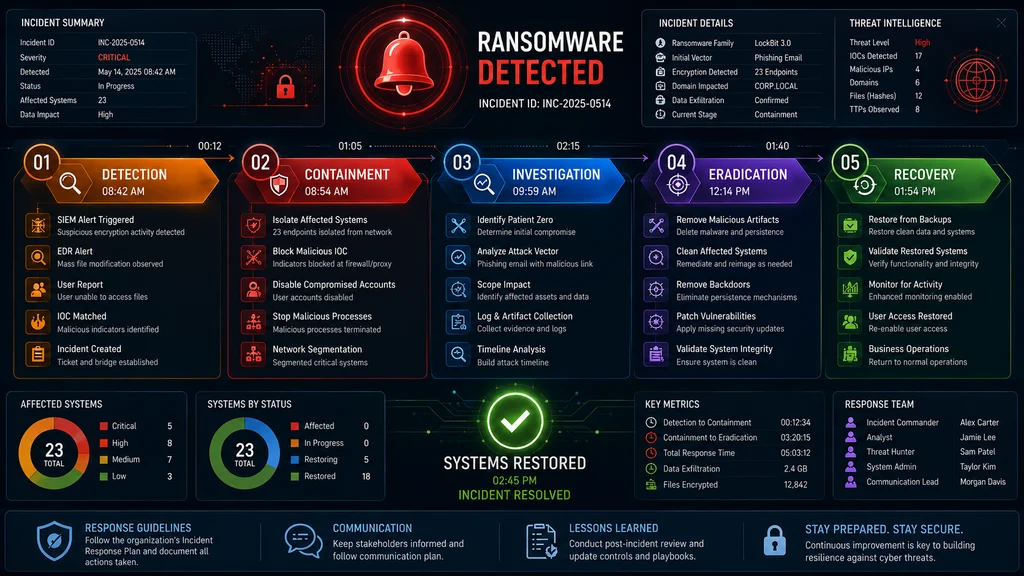
The best ransomware incident response plan follows a phased approach: Detect, Contain, Eradicate, and Recover. Every organization needs a documented plan with clear roles, communication protocols, and tested backups before an attack occurs . Top alternatives: ransomware playbook, cyber incident response framework, security breach containment strategy, data recovery blueprint, and threat remediation plan.Your screen freezes. A text file appears on your desktop with a name like “READ_ME.txt.” Your files are encrypted, and there’s a demand for cryptocurrency. Your heart is pounding, and you have no idea what to do next.
When ransomware strikes, you don’t rise to the occasion. You fall to your level of preparation . That’s why having a ransomware incident response plan ready before an attack is absolutely essential. Without one, teams scramble in different directions, evidence gets destroyed, and recovery takes weeks instead of hours .
The truth is, ransomware is one of the most significant threats facing organizations today. A single attack can disrupt operations, cause financial loss, and damage your reputation . But with the right plan in place, your teams know precisely what to do and who’s responsible for which steps . Let’s dive into over 100 strategies that will help you respond with confidence.
Detection and Validation Responses
1. Monitor for mass file encryption events
Example: Use this when you need to detect ransomware activity across your environment.
Meaning: Track systems where more than 100 files are modified within a minute to catch encryption in progress .
2. Look for volume shadow copy deletion attempts
Example: Use this when investigating suspicious system activity.
Meaning: Attackers often delete shadow copies to prevent recovery using commands like vssadmin delete shadows .
3. Check for ransom note file creation patterns
Example: Use this when hunting for threats across your network.
Meaning: Search for files named README, DECRYPT, or RANSOM that signal an active ransomware infection .
4. Document encrypted file structures and extensions
Example: Use this during initial triage to identify the ransomware variant.
Meaning: Note modified file extensions like .encrypted, .locked, or .crypt to help identify the specific strain .
5. Identify patient zero using EDR alerts
Example: Use this to find the source of the infection.
Meaning: Track down the earliest known indicator of compromise via endpoint detection tools to find the source network segment .
6. Preserve volatile evidence before powering down
Example: Use this when you discover an infected system.
Meaning: Do not power off machines immediately, as this destroys memory that forensics investigators need to find encryption keys .
7. Establish an immutable incident log immediately
Example: Use this as your first action when an incident is confirmed.
Meaning: Open a secure, offline incident log and timestamp every action and decision for future legal and forensic reviews .
8. Document what you know with confidence levels
Example: Use this to track information quality during the incident.
Meaning: Record what systems are affected, the blast radius, and confidence levels to avoid follow-on compromises during recovery .
9. Engage stakeholders and share relevant findings
Example: Use this to coordinate the response effort.
Meaning: Alert IT, managed security providers, cyber insurance contacts, and senior leadership .
10. Determine if data exfiltration occurred
Example: Use this when scoping the incident.
Meaning: Audit file transfer logs and cloud egress traffic, as modern ransomware groups almost always steal data before encryption .
11. Test for suspicious process behavior
Example: Use this when normal detection systems are quiet.
Meaning: Look for unusual process executions or C2 beaconing that may indicate pre-encryption activity .
12. Verify the threat is actually ransomware
Example: Use this before activating the full response.
Meaning: Confirm that the indicators match a known ransomware variant and not another type of malware .
Containment Responses
1. Isolate affected hosts immediately
Example: Use this in the first minutes of an incident.
Meaning: Disconnect compromised devices from local subnets, Wi-Fi, and corporate networks immediately .
2. Disconnect infected systems from the network
Example: Use this to stop lateral movement.
Meaning: Unplug affected devices from Ethernet, Wi-Fi, Bluetooth, and cellular connections to cut off the attacker’s access .
3. Protect systems not yet compromised
Example: Use this to prevent the attack from spreading.
Meaning: Prioritize isolation of critical systems, especially backups, which are essential for business recovery .
4. Disable compromised identities
Example: Use this to stop attackers from using stolen credentials.
Meaning: Terminate active sessions and disable affected user and service accounts across Active Directory and cloud identity providers .
5. Rotate privileged credentials
Example: Use this after you identify compromised accounts.
Meaning: Force password rotation for all domain admins, service accounts, and critical API keys .
6. Block command and control infrastructure
Example: Use this to disrupt attacker communications.
Meaning: Sinkhole identified threat actor IP addresses and domains at your perimeter firewall and EDR levels .
7. Disable remote access services
Example: Use this when remote access might be compromised.
Meaning: Temporarily disable VPNs, remote desktop, and single sign-on systems if they are implicated in the attack .
8. Use out-of-band communication channels
Example: Use this when the attacker might be monitoring email or chat.
Meaning: Coordinate the response using phone calls or secure channels outside the compromised environment .
9. Disable scheduled tasks and shared drives
Example: Use this to stop ransomware from spreading.
Meaning: Disable mechanisms that ransomware uses to move from one machine to many .
10. Restrict write permissions on network storage
Example: Use this to protect NAS and cloud services.
Meaning: Disconnect or limit write access to shared file storage to prevent encryption of backups .
11. Turn off unaffected equipment if safe
Example: Use this when protecting clean systems.
Meaning: If it’s not possible to isolate them, disconnect unaffected systems from the network .
12. Implement segmentation rules immediately
Example: Use this to contain the blast radius.
Meaning: Activate pre-defined segmentation rules that prevent lateral movement by design .
Evidence Preservation Responses
1. Capture forensic disk images
Example: Use this before wiping or restoring any system.
Meaning: Take images of representative affected systems before running any automated cleanup scripts .
2. Perform memory dumps of compromised equipment
Example: Use this when you need to preserve volatile data.
Meaning: Take RAM captures before powering down or rebooting systems .
3. Preserve logs from all sources
Example: Use this during the evidence collection phase.
Meaning: Pull logs from servers, endpoints, network devices, VPN, and cloud services before they roll over .
4. Take snapshots of virtual systems and cloud volumes
Example: Use this to capture the state of virtualized infrastructure.
Meaning: Snapshot affected VMs and cloud storage before making any changes .
5. Collect malware binaries and indicators
Example: Use this to identify the ransomware variant.
Meaning: Capture the ransomware executable and associated files for analysis .
6. Document all actions with timestamps
Example: Use this throughout the incident response.
Meaning: Record every action, observation, and decision for legal and forensic purposes .
7. Focus on “patient zero” machines for deep analysis
Example: Use this to understand the initial compromise vector.
Meaning: Prioritize forensic collection on the first affected systems to find the entry point .
8. Preserve highly volatile evidence first
Example: Use this during the initial investigation phase.
Meaning: Capture system memory, Windows Security logs, and firewall log buffers before they’re lost .
9. Do not reboot or reimage without capturing evidence
Example: Use this to avoid destroying forensic data.
Meaning: Resist the urge to “clean” systems, as this erases evidence your forensics partners need .
10. Collect logs for timeline analysis
Example: Use this to reconstruct the attack sequence.
Meaning: Gather VPN logs, Windows Event Logs, and firewall logs to build a timeline .
11. Document data that was exfiltrated
Example: Use this to understand the scope of the breach.
Meaning: Identify what data was accessed and notify legal and cyber insurance teams appropriately .
12. Save copies of all ransom notes
Example: Use this to identify the ransomware variant.
Meaning: Extract ransom note signatures and strings to check against threat intelligence repositories .
Investigation and Analysis Responses
1. Identify the ransomware strain
Example: Use this to determine if a decryptor exists.
Meaning: Match ransom note signatures against public threat intelligence to check for free, verified decryptors .
2. Determine the initial access vector
Example: Use this to understand how the attack started.
Meaning: Investigate whether the entry point was phishing, a VPN vulnerability, an exploit, or stolen credentials .
3. Map lateral movement paths
Example: Use this to understand how the attack spread.
Meaning: Investigate how the threat actor moved inside your network using credential theft, RDP, or other exploits .
4. Check for precursor malware
Example: Use this to find other threats in your environment.
Meaning: Look for TrickBot, Dridex, Emotet, or other malware commonly linked to ransomware operations .
5. Investigate persistence mechanisms
Example: Use this to find backdoors left behind.
Meaning: Look for rogue accounts, scheduled tasks, malicious PowerShell, PsExec usage, or Cobalt Strike implants .
6. Search for data exfiltration evidence
Example: Use this to determine if the attack involves double extortion.
Meaning: Review log data to see if attackers accessed and transferred sensitive information before encryption .
7. Identify compromised identities
Example: Use this to find which accounts attackers are using.
Meaning: Look for unusual access patterns from compromised user and service accounts .
8. Analyze connection logs for unusual IPs
Example: Use this when looking for C2 communication.
Meaning: Review outbound connections from infected systems for suspicious IP addresses .
9. Determine the timeline of attacker activity
Example: Use this to understand the full scope of the compromise.
Meaning: Reconstruct when attackers entered, what they did before deploying ransomware, and when encryption began .
10. Look for tools used in the attack
Example: Use this to understand attacker capabilities.
Meaning: Identify tools like PowerShell, batch files, or other utilities used in the attack .
11. Research guidance for the specific variant
Example: Use this to find variant-specific response steps.
Meaning: Check government advisories and reputable vendors for recommendations on the identified ransomware strain .
12. Consult threat intelligence for possible decryptors
Example: Use this when looking for recovery options.
Meaning: Check if researchers have published decryptors for the specific variant .
Communication and Notification Responses
1. Activate the incident response team
Example: Use this when you confirm an active ransomware incident.
Meaning: Alert the Incident Commander to activate your response framework and call tree .
2. Notify executive leadership immediately
Example: Use this before the rumor mill starts.
Meaning: Let your C-suite and board hear about the attack directly from you .
3. Engage legal counsel early
Example: Use this to protect privileged information.
Meaning: Bring internal and external legal counsel in early to align on regulatory exposure and privilege .
4. Notify your cyber insurance carrier
Example: Use this within the required reporting window.
Meaning: File a formal notice with your insurance carrier within their mandatory reporting timeframe .
5. Inform law enforcement
Example: Use this when you need threat intelligence or investigation support.
Meaning: Contact authorities for victim decryption key checks and credibility with stakeholders .
6. Name a communications lead
Example: Use this to centralize all messaging.
Meaning: Designate one person to handle both internal and external communication to avoid conflicting messages .
7. Craft clear instructions for employees
Example: Use this to help staff cooperate with the response.
Meaning: Provide simple guidance: disconnect affected devices, don’t reboot, report suspicious behavior .
8. Prepare internal messaging templates
Example: Use this to communicate with staff during the incident.
Meaning: Create holding statements that acknowledge the impact and set expectations for communications cadence .
9. Coordinate with communications/PR
Example: Use this when a widespread outage or data breach is possible.
Meaning: Prepare holding statements and decide what to communicate to customers, partners, and media .
10. Establish a single source of truth
Example: Use this to keep everyone aligned.
Meaning: Create a virtual war room or secure communications thread for all incident updates .
11. Handle breach notification requirements
Example: Use this when data exfiltration is confirmed.
Meaning: If evidence of exfiltration exists, coordinate with counsel on disclosures and regulatory requirements .
12. Keep Helpdesk on message
Example: Use this to manage incoming questions.
Meaning: Give Helpdesk specific talking points and direct all other inquiries to the communications lead .
Eradication Responses
1. Flush all persistence mechanisms
Example: Use this when preparing to restore systems.
Meaning: Scan for and delete malicious scheduled tasks, rogue registry keys, hidden local accounts, and malicious startup scripts .
2. Stop identified malicious processes
Example: Use this in your endpoint protection console.
Meaning: Kill confirmed ransomware processes to stop active encryption .
3. Block attacker files and addresses
Example: Use this to prevent re-infection.
Meaning: Block the attacker’s malicious files, IP addresses, and control channels .
4. Secure identity infrastructure first
Example: Use this before restoring any workloads.
Meaning: Ensure domain controllers and identity systems are completely clean before restoring applications .
5. Audit EDR health across all systems
Example: Use this before reconnecting systems to the network.
Meaning: Confirm endpoint detection agents are fully active and monitoring every system slated for reconnection .
6. Remove all malware components
Example: Use this to ensure no traces remain.
Meaning: Delete all malicious files, registry entries, and services associated with the attack .
7. Patch the initial access vector
Example: Use this to prevent recurrence.
Meaning: Remediate the vulnerability that allowed the initial compromise .
8. Disable or rotate all exposed credentials
Example: Use this to prevent re-entry through stolen accounts.
Meaning: Enforce MFA where possible and rotate credentials that may have been exposed .
9. Secure backup systems first
Example: Use this to protect your recovery path.
Meaning: Ensure backups are clean before starting any restoration .
10. Remove backdoor accounts
Example: Use this to eliminate hidden access.
Meaning: Delete rogue user accounts created by the attacker .
11. Verify all malware has been eliminated
Example: Use this before beginning restoration.
Meaning: Conduct thorough scans to confirm complete eradication .
12. Document all changes made
Example: Use this for future reference and audits.
Meaning: Record every remediation action taken during the eradication phase .
Recovery and Restoration Responses
1. Validate backup integrity before restoration
Example: Use this before any restore begins.
Meaning: Verify that offline, immutable, or air-gapped snapshots haven’t been modified or corrupted .
2. Restore to a point before the attackers entered
Example: Use this to avoid reintroducing backdoors.
Meaning: Ensure your recovery point predates the initial compromise .
3. Define your rebuild hierarchy
Example: Use this to prioritize critical services.
Meaning: Restore in order: identity and core network, critical applications, then end-user endpoints .
4. Test a representative restore in a clean enclave
Example: Use this before committing to broader restoration.
Meaning: Validate restore functionality before restoring production systems .
5. Rebuild systems from clean images
Example: Use this for guaranteed clean systems.
Meaning: Use known clean, pre-configured images where possible .
6. Confirm full remediation before returning to production
Example: Use this to ensure systems are safe.
Meaning: Verify that all systems are free of malware before reconnecting them .
7. Decide your restoration order now
Example: Use this to avoid switching mid-stream.
Meaning: Define priorities based on business impact analysis before starting recovery .
8. Monitor for signs of secondary reinfection
Example: Use this during the recovery phase.
Meaning: Watch for indicators that the attacker has returned .
9. Recover critical systems first
Example: Use this when you need to restore operations quickly.
Meaning: Prioritize revenue-generating systems, safety systems, and core services .
10. Verify that backups are not compromised
Example: Use this before relying on them for restoration.
Meaning: Check immutable and off-network copies for integrity .
11. Restore applications and user permissions
Example: Use this for a complete recovery.
Meaning: Remember that recovery requires system configurations and permissions, not just data .
12. Document the restore process
Example: Use this for future improvement.
Meaning: Record what worked and what didn’t for your playbook update .
Post-Incident Responses
1. Conduct a post-incident review
Example: Use this after the incident is resolved.
Meaning: Gather all teams to discuss what happened, how it was handled, and what could be improved.
2. Update your incident response plan
Example: Use this to learn from the experience.
Meaning: Incorporate lessons learned into your ransomware incident response plan .
3. Address identified gaps in security
Example: Use this to prevent future attacks.
Meaning: Implement security improvements based on root cause analysis .
4. Test your updated playbook
Example: Use this to validate improvements.
Meaning: Run tabletop exercises to ensure the updated plan works .
5. Report to regulators if required
Example: Use this when data breach notification is mandatory.
Meaning: Comply with regulatory notification requirements like CIRCA’s 72-hour rule .
6. Document everything for legal and insurance
Example: Use this for claims and compliance.
Meaning: Complete all required documentation for insurance claims and legal proceedings .
7. Provide employees with security awareness training
Example: Use this to strengthen the human firewall.
Meaning: Train staff on lessons learned and proper security behaviors.
8. Strengthen backup verification procedures
Example: Use this to ensure future recoverability.
Meaning: Improve processes for testing and validating backups .
9. Conduct regular tabletop exercises
Example: Use this to keep your team prepared.
Meaning: Practice scenarios under realistic conditions to surface gaps before a real incident .
10. Develop key performance indicators for detection
Example: Use this to measure response effectiveness.
Meaning: Track metrics like mean time to detect and mean time to respond.
11. Update threat intelligence sources
Example: Use this to improve future detection.
Meaning: Incorporate intelligence gained during the incident into your detection systems.
12. Share lessons learned with industry peers
Example: Use this to help the broader community.
Meaning: Share anonymized insights to help others prepare.
Prevention and Preparation Responses
1. Test backup restoration procedures regularly
Example: Use this to ensure backups are restorable.
Meaning: “Having backups” isn’t the same as “having restorable backups” .
2. Practice with tabletop exercises
Example: Use this to prepare your team.
Meaning: Walk through scenarios under realistic conditions to identify gaps .
3. Define clear roles and responsibilities
Example: Use this before an incident occurs.
Meaning: Assign responsibilities across security, IT, legal, and communications teams .
4. Document your ransomware playbook
Example: Use this to eliminate ambiguity during an attack.
Meaning: Create a step-by-step guide that lays out how teams detect, contain, investigate, and recover .
5. Establish escalation triggers
Example: Use this to know when to escalate.
Meaning: Define clear triggers for involving executive leadership and external support .
6. Create pre-approved messaging templates
Example: Use this to communicate quickly during an incident.
Meaning: Develop templates for internal and external communication to reduce stress during an attack .
7. Map your critical systems and dependencies
Example: Use this to know what to prioritize.
Meaning: Identify which systems are most important for business operations .
8. Practice restoration from offline backups
Example: Use this to verify recovery procedures.
Meaning: Regularly test restoration from immutable or air-gapped backups .
9. Decide on ransom payment criteria in advance
Example: Use this to avoid making emotional decisions during an attack.
Meaning: Predefine criteria: legal considerations, backup availability, business impact, and threat actor credibility .
10. Train personnel on their incident roles
Example: Use this to ensure everyone knows what to do.
Meaning: Make sure each person knows how to perform their assigned tasks .
11. Establish contact lists before an incident
Example: Use this to avoid scrambling for phone numbers at 2 AM.
Meaning: Fill in contact details for IT, legal, insurance, law enforcement, and external partners now .
12. Run security awareness programs for employees
Example: Use this to strengthen your first line of defense.
Meaning: Educate staff on recognizing and reporting phishing attempts .
FAQ
What is a ransomware incident response plan?
A ransomware incident response plan is a documented strategy that defines how your organization detects, contains, investigates, and recovers from a ransomware attack. It includes roles, responsibilities, procedures, and communication protocols.
Why is a response plan important?
Without a plan, teams fall into reactive patterns, systems stay infected longer, and critical communication gets delayed. A plan eliminates ambiguity, establishes ownership, and ensures every action aligns with recovery strategy .
What should a ransomware playbook include?
A comprehensive playbook includes roles and responsibilities, communication procedures, decision criteria for ransom payment, containment and eradication steps, and recovery procedures with tested backups .
Should I pay the ransom?
Ransom payment decisions involve legal, regulatory, and business considerations. Paying doesn’t guarantee recovery and can encourage further attacks. Most cyber insurance policies now discourage or prohibit payment .
How long should the response take?
The most critical actions happen in the first 60 minutes. Containment and scoping typically occur within hours, eradication within 24 hours, and recovery may take days or weeks depending on the scope .
Conclusion
Having a ransomware incident response plan ready isn’t optional anymore. It’s the difference between a contained incident and a company-wide disaster. The truth is, when ransomware strikes, time becomes your most constrained resource. Without a plan, teams make ad hoc decisions with real operational consequences .
The strategies in this guide represent the essential elements of modern ransomware response. From the critical first 60 minutes of detection and containment through full recovery and post-incident review, each phase requires thoughtful preparation and clear action.
Remember, you don’t rise to the occasion during a crisis. You fall to your level of preparation. That’s why building, testing, and refining your ransomware incident response plan before an attack is the smartest investment you’ll ever make .
Bookmark this guide, share it with your team, and start preparing today. The next attack could come at any moment, and when it does, you’ll be ready.





10 thoughts on “200+ Best Ransomware Incident Response Plan Strategies for 2026”