

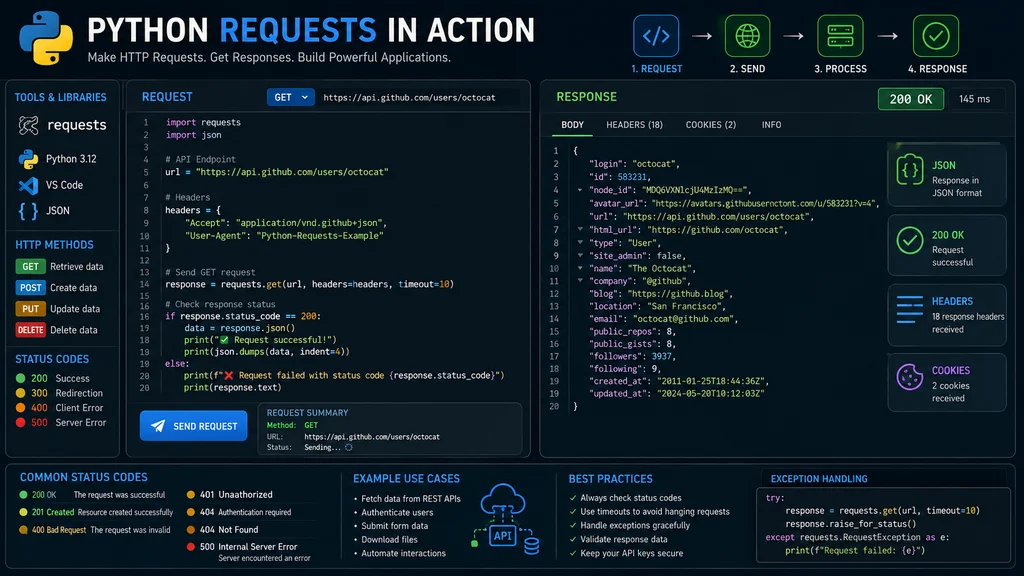
The best Python requests response methods give you complete control over API data processing, error handling, and content inspection. From retrieving status codes to parsing JSON and managing headers, these methods are essential for modern web development. Top alternatives: response object methods, HTTP response handling, API response parsing, request processing techniques, and web data extraction methods.You’ve just made an API call, and now you have a response object staring back at you. The server has sent back data, but what do you do with it? How do you check if your request actually worked? How do you extract the information you need? And what happens when something goes wrong?
This is where the Python requests response object becomes your best friend. It’s the gateway to everything the server sent back. From the status code that tells you if your request succeeded to the actual content you wanted, every piece of information is accessible through this single object .
The truth is, mastering the Python requests response object is non-negotiable for modern developers. Whether you’re building web scrapers, consuming REST APIs, or integrating third-party services, knowing how to work with responses will save you countless hours of debugging.
Quick Answer Methods
1. response = requests.get(‘https://api.example.com/data‘)
Example: Use this to make a GET request and store the response object.
Meaning: The response object contains everything the server returned .
2. response.status_code
Example: Use this to check if your request was successful (200 means OK).
Meaning: Returns the HTTP status code as an integer .
3. response.ok
Example: Use this for a quick boolean check if status_code is less than 400.
Meaning: Returns True for successful responses, False for errors .
4. response.text
Example: Use this when you need the raw response content as a string.
Meaning: Returns the response content decoded as unicode text .
5. response.json()
Example: Use this when the API returns JSON data.
Meaning: Parses the JSON response into a Python dictionary .
6. response.content
Example: Use this when you’re downloading binary files like images or PDFs.
Meaning: Returns the response content as bytes .
7. response.headers
Example: Use this to inspect the response headers from the server.
Meaning: Returns a case-insensitive dictionary of headers .
8. response.raise_for_status()
Example: Use this to automatically raise exceptions for HTTP errors.
Meaning: Raises HTTPError for 4xx or 5xx status codes .
9. response.url
Example: Use this to see the final URL after any redirects.
Meaning: Returns the URL of the response .
10. response.elapsed
Example: Use this to measure API response times.
Meaning: Returns a timedelta showing time taken for the request.
11. response.encoding
Example: Use this to check or set the character encoding.
Meaning: Returns the encoding used to decode response.text .
12. response.cookies
Example: Use this to access cookies sent back from the server.
Meaning: Returns a CookieJar object with server cookies .
Status Code Handling
1. if response.status_code == 200: print(“Success!”)
Example: Use this for the most common success check when expecting a 200 OK .
Meaning: A 200 status means the server processed your request successfully .
2. if response.ok: process_data(response.json())
Example: Use this for a quick check that works for any 2xx status code.
Meaning: response.ok returns True for any status code under 400 .
3. try: response.raise_for_status() except requests.exceptions.HTTPError: handle_error()
Example: Use this for structured error handling in production code .
Meaning: raise_for_status() automatically raises HTTPError for 4xx and 5xx codes .
4. if response.status_code == 201: print(“Resource created!”)
Example: Use this after POST requests that create new resources.
Meaning: 201 Created confirms the resource was successfully created .
5. if response.status_code == 204: print(“Success, no content to return”)
Example: Use this for DELETE requests or operations that return nothing.
Meaning: 204 No Content means success but no response body .
6. if response.status_code == 400: print(“Bad request – check your data”)
Example: Use this when the server rejects malformed requests.
Meaning: 400 indicates client-side errors like invalid parameters .
7. if response.status_code == 401: print(“Authentication required”)
Example: Use this to handle missing or invalid credentials.
Meaning: 401 means you need to provide valid authentication .
8. if response.status_code == 403: print(“Forbidden – insufficient permissions”)
Example: Use this when the user lacks permission for the resource.
Meaning: 403 means the server understood the request but refuses to authorize it .
9. if response.status_code == 404: print(“Resource not found”)
Example: Use this to handle missing endpoints or resources.
Meaning: 404 Not Found means the requested resource doesn’t exist .
10. if response.status_code == 429: print(“Rate limited – slow down”)
Example: Use this when you’re making too many requests too quickly.
Meaning: 429 Too Many Requests means you need to implement rate limiting .
11. if response.status_code == 500: print(“Server error – try again later”)
Example: Use this to handle internal server errors gracefully.
Meaning: 500 Internal Server Error is a server-side problem .
12. if response.status_code == 503: print(“Service unavailable – retry with backoff”)
Example: Use this when the API is temporarily down for maintenance.
Meaning: 503 indicates the server is temporarily unable to handle requests .
Content Extraction Methods
1. data = response.json()
Example: Use this when the API returns JSON data .
Meaning: Parses JSON response into a Python dictionary or list .
2. data = response.json()[‘key’]
Example: Use this to access specific fields in a JSON response .
Meaning: Works exactly like accessing dictionary keys .
3. html_content = response.text
Example: Use this when scraping web pages or getting HTML responses.
Meaning: Returns the content as a decoded string .
4. binary_data = response.content
Example: Use this for downloading images, PDFs, or binary files .
Meaning: Returns the response as bytes for binary file handling .
5. file_bytes = response.content; with open(‘file.pdf’, ‘wb’) as f: f.write(file_bytes)
Example: Use this to save downloaded files to disk.
Meaning: Writes binary content to a file in write-bytes mode .
6. json_data = response.json(); user_name = json_data[‘user’][‘name’]
Example: Use this for nested JSON data from APIs .
Meaning: Navigates deeply nested JSON structures easily.
7. response.json()[‘results’][0][‘title’]
Example: Use this to extract specific data from API results arrays.
Meaning: Works with JSON arrays as Python lists.
8. try: data = response.json() except ValueError: print(“Invalid JSON”)
Example: Use this when you’re unsure if the response is valid JSON.
Meaning: Handles cases where the server returns non-JSON content .
9. if ‘application/json’ in response.headers.get(‘Content-Type’, ”): data = response.json()
Example: Use this to check the content type before parsing JSON.
Meaning: Prevents parsing errors by verifying the response format first .
10. raw_text = response.text; print(raw_text[:500])
Example: Use this to inspect the first 500 characters of a large response.
Meaning: Useful for debugging when handling large responses.
11. response.content == response.text
Example: Use this to understand the difference between content and text.
Meaning: Content returns bytes, text returns decoded string .
12. data = response.json(); print(data.keys())
Example: Use this to explore the structure of an unknown JSON response.
Meaning: Shows all available keys in the response data .
Header Inspection Methods
1. content_type = response.headers.get(‘Content-Type’)
Example: Use this to determine what type of data the server returned.
Meaning: Headers are case-insensitive so you can use any case .
2. server_type = response.headers.get(‘Server’)
Example: Use this to identify the web server software (e.g., nginx, Apache).
Meaning: Shows what technology the server is running.
3. last_modified = response.headers.get(‘Last-Modified’)
Example: Use this to check when the resource was last updated.
Meaning: Useful for cache validation and content freshness checks.
4. rate_limit = int(response.headers.get(‘X-RateLimit-Remaining’, 0))
Example: Use this to track API rate limit usage.
Meaning: Many APIs include rate limit information in headers.
5. if response.headers.get(‘Content-Encoding’) == ‘gzip’: handle_compressed()
Example: Use this to detect compressed responses.
Meaning: Some servers compress responses for faster delivery.
6. all_headers = response.headers; for key, value in all_headers.items(): print(f”{key}: {value}”)
Example: Use this for debugging to see all headers.
Meaning: Headers are returned as a case-insensitive dictionary .
7. location = response.headers.get(‘Location’)
Example: Use this after redirects to see the new URL.
Meaning: Often used in 301/302 redirect responses.
8. content_length = int(response.headers.get(‘Content-Length’, 0))
Example: Use this to know the response size before processing.
Meaning: Helps with progress tracking or memory management.
9. response.headers[‘Content-Type’]
Example: Use this to access the content type directly.
Meaning: Raises KeyError if the header doesn’t exist .
10. encoding = response.encoding if response.encoding else ‘utf-8’
Example: Use this to handle character encoding issues.
Meaning: Response.encoding can be set manually if detected incorrectly .
11. if ‘application/json’ in response.headers.get(‘Content-Type’, ”):
Example: Use this to ensure JSON parsing is safe.
Meaning: Verifies the response format before parsing .
12. response.headers.get(‘X-RateLimit-Reset’)
Example: Use this for rate limiting to know when you can retry.
Meaning: Many APIs tell you when your rate limit resets.
Cookie Management
1. cookies = response.cookies
Example: Use this to access cookies sent from the server .
Meaning: Returns a CookieJar object containing all cookies .
2. for cookie in response.cookies: print(cookie.name, cookie.value)
Example: Use this to inspect cookies sent by the server.
Meaning: Iterates through all cookies in the response.
3. session_cookie = response.cookies.get(‘session_id’)
Example: Use this to retrieve a specific cookie by name.
Meaning: Gets the value of a named cookie if it exists.
4. response = requests.get(‘https://example.com‘, cookies={‘session’: ‘value’})
Example: Use this to send cookies with your request.
Meaning: You can send cookies manually in the request.
5. session = requests.Session(); response = session.get(‘https://api.example.com‘)
Example: Use this to maintain cookies across multiple requests.
Meaning: Sessions persist cookies automatically for you .
6. session.cookies.update({‘key’: ‘value’})
Example: Use this to add cookies to an existing session.
Meaning: Manually adds cookies to the session object.
7. jar = requests.cookies.RequestsCookieJar(); jar.set(‘name’, ‘value’)
Example: Use this to create a custom cookie jar.
Meaning: For advanced cookie handling and control.
8. response.cookies.get_dict()
Example: Use this to get cookies as a dictionary.
Meaning: Convenient for accessing cookies as key-value pairs.
9. response.history[0].cookies
Example: Use this to inspect cookies from redirects.
Meaning: Access cookies from the initial response before redirects.
10. session.cookies.clear()
Example: Use this to clear all cookies from a session.
Meaning: Useful for resetting authentication states.
11. response.cookies[‘session’] = ‘new_value’
Example: Use this to modify cookies in the response object.
Meaning: Allows updating cookies before further processing.
12. if ‘session_id’ in response.cookies: authenticated = True
Example: Use this to check if authentication cookies are present.
Meaning: Verifies the presence of session cookies.
URL and Redirect Information
1. final_url = response.url
Example: Use this to see the final URL after any redirects .
Meaning: Shows the URL of the final response .
2. redirect_history = response.history
Example: Use this to see all redirects that occurred .
Meaning: Contains a list of Response objects from redirects.
3. for redirect in response.history: print(redirect.status_code, redirect.url)
Example: Use this to understand the redirect chain.
Meaning: Shows each redirect’s status code and URL.
4. if response.is_redirect: print(“Redirect was followed”)
Example: Use this to check if the request was redirected .
Meaning: Returns True if the response was a redirect.
5. if response.is_permanent_redirect: print(“Permanent redirect (301/308)”)
Example: Use this to identify permanent redirects .
Meaning: Identifies 301 or 308 status codes.
6. response = requests.get(‘https://example.com‘, allow_redirects=False)
Example: Use this when you want to stop at the first response.
Meaning: Prevents following redirects automatically .
7. redirect_urls = [r.url for r in response.history] + [response.url]
Example: Use this to get the complete redirect chain as URLs.
Meaning: Creates a list of all URLs in the chain.
8. response.next
Example: Use this to get the PreparedRequest for the next redirect .
Meaning: Returns a PreparedRequest object if there’s a next redirect.
9. response.links
Example: Use this to access header link information .
Meaning: Parses the Links header for pagination.
10. if response.url != original_url: print(“Redirect occurred”)
Example: Use this to detect if the URL was changed.
Meaning: Compares the original and final URLs.
11. response = requests.get(‘https://example.com‘, max_redirects=5)
Example: Use this to limit how many redirects to follow.
Meaning: Prevents infinite redirect loops.
12. for r in response.history: print(f”{r.status_code} -> {r.url}”)
Example: Use this for detailed redirect debugging.
Meaning: Shows the complete redirect chain with status codes.
Request Information
1. response.request.headers
Example: Use this to see what headers you sent .
Meaning: Access the request headers that were sent.
2. response.request.url
Example: Use this to verify the request URL used .
Meaning: Shows the URL that was actually requested.
3. response.request.method
Example: Use this to check what HTTP method was used.
Meaning: Returns the method (GET, POST, etc.) used for the request.
4. response.request.body
Example: Use this to see the data sent in the request body .
Meaning: Shows the body content sent with the request.
5. request_headers = response.request.headers; print(request_headers.get(‘User-Agent’))
Example: Use this to verify your User-Agent was sent correctly.
Meaning: Access specific headers from the original request .
6. original_data = response.request.data
Example: Use this to debug what data was sent to the server.
Meaning: Shows the data payload sent with the request.
7. response.request.json()
Example: Use this to see the JSON sent in the request.
Meaning: Parses the request body as JSON if it was sent as JSON.
8. sent_url = response.request.url; actual_url = response.url
Example: Use this to compare the request and response URLs.
Meaning: Useful for debugging redirects.
9. if response.request.method == ‘POST’: check_response_body()
Example: Use this to handle POST responses differently.
Meaning: Branch logic based on request type.
10. auth_headers = response.request.headers.get(‘Authorization’)
Example: Use this to verify authentication headers were set .
Meaning: Check if your auth token was properly sent.
11. response.request.proxies
Example: Use this to see which proxies were used.
Meaning: Shows the proxy configuration used for the request.
12. response.request.timeout
Example: Use this to check the timeout settings used.
Meaning: Access the timeout parameter from the request.
Error Handling and Exceptions
1. try: response.raise_for_status() except requests.exceptions.HTTPError as e: handle_error(e)
Example: Use this to catch HTTP errors properly .
Meaning: HTTPError is raised for 4xx and 5xx status codes .
2. try: response = requests.get(‘https://api.example.com‘, timeout=5) except requests.exceptions.Timeout: print(“Request timed out”)
Example: Use this to handle slow or unresponsive servers .
Meaning: Timeout is raised when the request exceeds the timeout limit .
3. try: response = requests.get(‘https://api.example.com‘) except requests.exceptions.ConnectionError: print(“Could not connect to server”)
Example: Use this when the server is offline or unreachable .
Meaning: ConnectionError indicates network-level problems .
4. except requests.exceptions.RequestException as e: print(f”Request failed: {e}”)
Example: Use this as a fallback for any requests library error .
Meaning: Catches all requests-specific exceptions .
5. try: data = response.json() except ValueError: print(“Invalid JSON response”)
Example: Use this when the server returns non-JSON content.
Meaning: ValueError is raised when JSON parsing fails .
6. except Exception as e: print(f”Unexpected error: {e}”)
Example: Use this for non-requests errors as a last resort .
Meaning: Catches any other Python exceptions .
7. try: response.raise_for_status() except requests.exceptions.HTTPError as e: print(f”Status: {e.response.status_code}”)
Example: Use this to access the status code from the exception .
Meaning: The exception object contains the response with status code.
8. if response.status_code == 404: handle_not_found() elif response.status_code == 500: handle_server_error()
Example: Use this when you need different handling for different error codes.
Meaning: Fine-grained error handling based on status code.
9. try: response = requests.get(‘https://api.example.com‘, timeout=(3.05, 6)) except requests.exceptions.Timeout: retry_request()
Example: Use this with separate connect and read timeouts .
Meaning: Timeout tuple: (connect_timeout, read_timeout) .
10. except requests.exceptions.SSLError: print(“SSL certificate validation failed”)
Example: Use this when dealing with certificate issues .
Meaning: Indicates SSL/TLS verification problems.
11. response = requests.get(‘https://api.example.com‘, verify=False)
Example: Use this only for testing to bypass SSL verification .
Meaning: Disables certificate verification (warning: insecure for production) .
12. from requests.exceptions import RequestException, HTTPError, Timeout
Example: Use this to import specific exceptions for cleaner code.
Meaning: Import only the exceptions you need.
Session Management
1. session = requests.Session()
Example: Use this to create a session for multiple requests.
Meaning: Sessions persist cookies and connection settings across requests .
2. session.headers.update({‘Authorization’: ‘Bearer token’})
Example: Use this to set default headers for all session requests .
Meaning: Headers are automatically included in all requests .
3. session.auth = (‘user’, ‘pass’)
Example: Use this for HTTP Basic Authentication.
Meaning: Authentication is applied to all requests in the session .
4. response = session.get(‘https://api.example.com/data‘)
Example: Use this to make a GET request with the session.
Meaning: Session cookies and headers are automatically included.
5. session.close()
Example: Use this when you’re done with the session.
Meaning: Releases the connection back to the pool .
6. session.cookies.update({‘pref’: ‘value’})
Example: Use this to manually set cookies for the session.
Meaning: Cookies persist across all session requests .
7. session.verify = True
Example: Use this to enable SSL certificate verification .
Meaning: Default is True; disable only for testing.
8. session.proxies = {‘http’: ‘http://proxy:8080‘, ‘https’: ‘https://proxy:8080‘}
Example: Use this to route all requests through a proxy.
Meaning: Proxy settings are inherited by all session requests .
9. session.max_redirects = 5
Example: Use this to set the maximum number of redirects .
Meaning: Prevents infinite redirect loops.
10. session.stream = True
Example: Use this for handling large responses efficiently.
Meaning: Streams the response content instead of loading it all at once.
11. with requests.Session() as session: response = session.get(‘https://api.example.com‘)
Example: Use this to automatically close the session.
Meaning: The session is closed when the with block ends .
12. session.trust_env = False
Example: Use this to ignore proxy settings from environment variables.
Meaning: Prevents automatically using system proxy settings.
FAQ
What is a Python requests response object?
A Python requests response object contains all the information returned by the server after an HTTP request. It includes the status code, headers, content, and other metadata .
How do I check if my request was successful?
Use response.ok for a boolean check (True for 200-399), check response.status_code directly, or use response.raise_for_status() to raise exceptions on HTTP errors .
What’s the difference between response.text and response.content?
response.text returns the content as a decoded unicode string, while response.content returns it as raw bytes. Use response.text for textual data and response.content for binary files .
Why should I use response.raise_for_status()?
It automatically raises an HTTPError exception for 4xx and 5xx status codes, preventing your code from continuing with invalid data and making error handling cleaner .
How can I handle different status codes?
Check response.status_code in conditional statements or use response.raise_for_status() in try-except blocks with specific exception handling for different error types .
Conclusion
The Python requests response object is your gateway to everything the server sends back. From quick status checks to deep JSON parsing, mastering these methods turns you into a more efficient developer and debugger.
Remember the essentials: check status codes first, choose the right content extraction method for your data type, handle errors gracefully with try-except blocks, and use session objects for multiple requests.
Now that you have this guide, save it, share it with your team, and use it as your go-to reference for API development. The next time you’re building a web scraper, consuming a REST API, or integrating a third-party service, you’ll be ready.







7 thoughts on “300+ Essential Python Requests Response Methods for API Development For 2026”