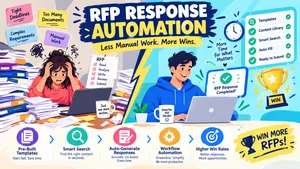

The best tender response software uses AI to automate proposal generation, analyze RFP requirements, and centralize bid knowledge, helping teams win more business. Top alternatives: SEQUESTO, Responsive, AutoRFP.ai, Altura, and BidScript.You’ve finally found the perfect tender opportunity. The requirements match your capabilities perfectly. Your team is ready to go. But then you look at the clock, the 500-page RFP document, and the spreadsheet with 300+ questions that need to be answered by Friday. Your heart sinks.
Responding to tenders, RFPs, and RFIs has always been one of the most stressful, time-consuming, and frustrating parts of winning new business . Manual processes, scattered information, and tight deadlines create an environment where mistakes happen and opportunities slip away.
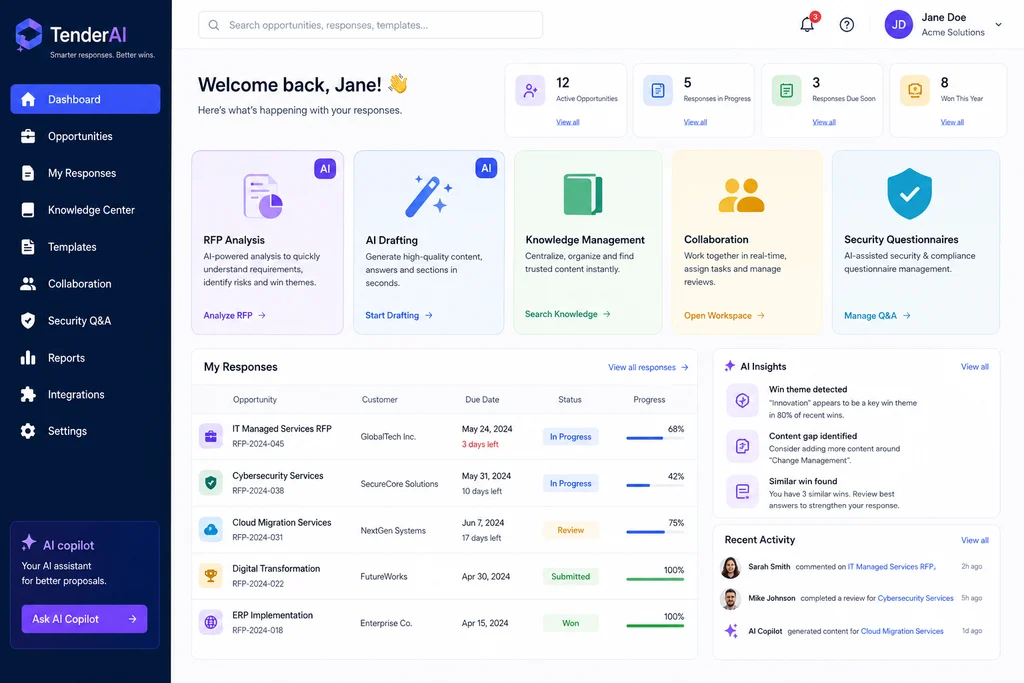
That’s where tender response software comes in. Modern platforms use AI to automate the entire lifecycle, from analyzing documents and generating first drafts to managing collaboration and tracking compliance . The best tender response software doesn’t just save time, it helps you win more bids by creating higher quality, more consistent proposals.
Whether you’re in software, healthcare, financial services, or facility management, tender response software can transform your bid process from chaos to confidence .
- AI-Powered Drafting Responses
1. Generate first drafts in under 5 minutes for 40-50 page proposals
Example: Use this when you need to quickly respond to a complex tender with tight deadlines.
Meaning: AI can produce the initial draft structure and content for lengthy technical bids .
2. Complete 80% or more of a first draft automatically
Example: Use this to reduce manual writing and focus on strategic customization.
Meaning: AI draft generation lets bid teams focus on high-value work rather than repetitive typing .
3. Use previous winning bids to create new responses
Example: Use this when you have a library of successful proposals.
Meaning: AI leverages your organizational memory to ensure consistency and quality .
4. Automatically pull relevant content from your knowledge base
Example: Use this to avoid reinventing answers for common questions.
Meaning: Intelligent search finds and repurposes approved content instantly .
5. Transform storyboarded ideas into compelling drafts
Example: Use this when you need to develop complex, multi-section proposals.
Meaning: AI turns rough concepts into structured, persuasive content .
6. Generate responses in multiple languages
Example: Use this when bidding on international opportunities.
Meaning: AI handles translation and adaptation without additional cost .
7. Get best-of recommendations from your content library
Example: Use this to ensure you’re always using the strongest content.
Meaning: AI analyzes your content library to recommend the most relevant existing responses .
8. Refine responses with built-in AI prompts
Example: Use this to tailor content for specific buyers or opportunities.
Meaning: Quick adjustments for tone, length, or emphasis without starting over .
9. Create contextually appropriate responses with trust scoring
Example: Use this when you need to verify response accuracy.
Meaning: AI assesses how well content matches new requirements .
10. Integrate company values and strategic inputs seamlessly
Example: Use this to ensure consistent messaging across all responses.
Meaning: AI weaves key themes throughout the entire proposal .
11. Process spreadsheets, Word docs, and PDFs automatically
Example: Use this when tenders arrive in different formats.
Meaning: AI OCR processes any document format without manual data entry .
12. Generate first drafts by analyzing your content library
Example: Use this for complex bids requiring multiple content sources.
Meaning: AI draws from past responses and company documentation for accuracy .
RFP Analysis and Qualification Responses
1. Use Go/No-Go decision tools to qualify opportunities
Example: Use this to quickly decide whether to pursue a bid.
Meaning: Analyze tender requirements against your capabilities to avoid wasted effort .
2. Conduct complex fit analyses in seconds
Example: Use this when evaluating multiple opportunities.
Meaning: Rapidly assess whether tenders match your expertise and capacity .
3. Extract and sort key requirements into compliance tables
Example: Use this to ensure you address all mandatory criteria.
Meaning: AI identifies and organizes evaluation criteria for easy reference .
4. Analyze tender documentation automatically
Example: Use this when faced with hundreds of pages of requirements.
Meaning: Systems process and organize information for the project team .
5. Score opportunities based on your past wins
Example: Use this to prioritize your bid pipeline objectively.
Meaning: AI ranks tenders by relevance using data-driven insights .
6. Identify mandatory requirements and evaluation criteria
Example: Use this to avoid missing critical compliance elements.
Meaning: Intelligent document acquisition highlights what matters most .
7. Get indicative scoring for draft submissions
Example: Use this to assess competitiveness before final submission.
Meaning: Independent assessment identifies weaknesses and improvement opportunities .
8. Flag inconsistencies with compliance matrices
Example: Use this to catch issues before submission deadlines.
Meaning: Non-compliance features highlight areas missing requirements .
9. Centralize comparison criteria and results
Example: Use this to track competitor positioning.
Meaning: Benchmarking support helps identify gaps and improvement areas .
10. Receive alerts for matching tenders
Example: Use this to never miss an opportunity.
Meaning: Automated notifications when new tenders match your criteria .
11. Use signal scores to rank opportunities
Example: Use this for data-driven pipeline prioritization.
Meaning: AI scores tenders based on buyer alignment and your stated expertise .
12. Track competitor assessments automatically
Example: Use this to inform strategic bidding decisions.
Meaning: Ongoing competitor analysis highlights where to focus efforts .
- Knowledge Management Responses
1. Store all approved responses in a centralized knowledge base
Example: Use this to eliminate scattered content across emails and drives.
Meaning: A single source of truth for all company information .
2. Automatically incorporate approved responses into future bids
Example: Use this to build a virtuous cycle of continuous improvement.
Meaning: Each win makes the next response faster and better .
3. Use the “Collective Memory” system for intelligent content management
Example: Use this to proactively deliver winning answers.
Meaning: AI delivers relevant content regardless of language or format .
4. Manage over 18,000 pieces of collateral effectively
Example: Use this for large enterprises with extensive content libraries.
Meaning: Content management capabilities scale to meet enterprise needs .
5. Access content directly from everyday productivity tools
Example: Use this to work within existing workflows.
Meaning: Integration with Salesforce, Microsoft, Google, and Slack .
6. Centralize and segment bid documents in one place
Example: Use this for efficient library management.
Meaning: Easy access to past performance records and market intelligence .
7. Use version control for document tracking
Example: Use this to avoid confusion during collaborative editing.
Meaning: Track changes and maintain document history .
8. Pull content from existing bid libraries
Example: Use this when integrating with existing document management systems.
Meaning: Connections to SharePoint, Google Drive, or Dropbox .
9. Store past winning RFPs and tenders for reference
Example: Use this to learn from successful submissions.
Meaning: Historical data informs future responses .
10. Access pre-validated sections and reusable content
Example: Use this for faster, more consistent proposals.
Meaning: Standardized content ensures quality and reduces errors .
11. Use AI to locate answers directly from your knowledge base
Example: Use this when you need fast access to specific information.
Meaning: Intelligent search finds the right content when you need it .
12. Maintain automated library updates
Example: Use this to keep your knowledge base current.
Meaning: Approved responses become available for future bids without manual updates .
Collaboration and Workflow Responses
1. Assign tasks to subject matter experts with clear deadlines
Example: Use this when multiple team members contribute to a bid.
Meaning: Project management tools keep everyone accountable .
2. Track progress with comprehensive dashboards
Example: Use this for real-time visibility into bid status.
Meaning: Know which sections are complete and where blockers exist .
3. Enable real-time collaboration across unlimited users
Example: Use this when coordinating large, cross-functional teams.
Meaning: Multiple contributors work simultaneously without email chains .
4. Use in-platform commenting for requirement discussion
Example: Use this to clarify requirements without switching tools.
Meaning: Centralized communication reduces confusion .
5. Manage the bid pipeline from qualification to submission
Example: Use this to track multiple opportunities simultaneously.
Meaning: Pipeline management keeps everything organized .
6. Boost team engagement with clear responsibilities
Example: Use this to turn frustration into productive momentum.
Meaning: Clarity on roles improved engagement by 30% in some organizations .
7. Upload Excel spreadsheets and edit embedded documents
Example: Use this for questionnaire-style tenders.
Meaning: Native Excel editing simplifies short-form responses .
8. Use embedded MS Word Editor for tender responses
Example: Use this for long-form narrative proposals.
Meaning: Familiar editing environment with AI assistance .
9. Automate collaborative review processes
Example: Use this to streamline approvals.
Meaning: Review workflows maintain quality standards .
10. Get progress visibility at a glance
Example: Use this for last-minute rush periods.
Meaning: See everything that needs attention before deadlines .
11. Integrate with Salesforce for pipeline visibility
Example: Use this to align with existing sales processes.
Meaning: Sales leaders see public sector opportunities alongside commercial deals .
12. Use push notifications via Slack or Teams
Example: Use this to keep teams informed where they already work.
Meaning: Notifications for new tenders and deadlines in existing channels .
Compliance and Quality Control Responses
1. Conduct pre-submission compliance reviews
Example: Use this to catch issues before final submission.
Meaning: Automated review functions identify errors and gaps .
2. Receive practical recommendations for improvement
Example: Use this to strengthen bids based on scoring criteria.
Meaning: AI provides actionable feedback on weak areas .
3. Assess whether your draft actually addresses scoring criteria
Example: Use this to ensure you don’t sound convincing but fail to address requirements.
Meaning: Independent assessment of competitiveness before submission .
4. Track feedback for continuous improvement
Example: Use this to learn from past submissions.
Meaning: Review capabilities ensure fast access to insights and improvement areas .
5. Get compliance matrices for complex tenders
Example: Use this to verify every requirement is addressed.
Meaning: Automated matrices ensure no mandatory criteria are missed .
6. Perform gamma review for automatic response assessment
Example: Use this to evaluate responses against RFP criteria.
Meaning: AI-driven review highlights compliance gaps .
7. Maintain consistent quality standards across all responses
Example: Use this to protect your brand reputation.
Meaning: Templates and systematic reviews ensure quality consistency .
8. Reduce error rates in submissions
Example: Use this to avoid losing winnable bids to errors.
Meaning: Systematic quality control catches mistakes early .
9. Use non-compliance features to flag inconsistencies
Example: Use this for complex compliance matrices.
Meaning: AI identifies where responses don’t meet evaluation criteria .
10. Track assessment summaries for accountability
Example: Use this to demonstrate performance transparency.
Meaning: Clear feedback supports future bid improvement .
11. Ensure AI-generated content properly addresses criteria
Example: Use this when using AI for first drafts.
Meaning: Quality control prevents convincing but non-compliant submissions .
12. Get independent assessment before going to market
Example: Use this for final verification before submission.
Meaning: Objectivity check improves competitiveness .
Time and Cost Efficiency Responses
1. Cut response preparation from days to minutes
Example: Use this when facing multiple simultaneous deadlines.
Meaning: AI dramatically reduces time-to-draft for complex tenders .
2. Achieve 63% time savings on responses
Example: Use this to justify software investment to stakeholders.
Meaning: Measurable efficiency gains from AI automation .
3. Reduce RFP draft time by 60%
Example: Use this when team productivity needs improvement.
Meaning: Faster first drafts free up strategic work time .
4. Complete security questionnaires 87% faster
Example: Use this for security-heavy industries like healthcare.
Meaning: Automated questionnaire responses save substantial time .
5. Achieve 37% cost reduction in bid management
Example: Use this for budget-conscious organizations.
Meaning: Lower labor costs through automation .
6. Complete security questionnaires in 3-4 hours instead of 30
Example: Use this when security RFPs drain team resources.
Meaning: Massive time savings on repetitive security questions .
7. Reduce content management costs systematically
Example: Use this when maintaining large content libraries.
Meaning: Efficient knowledge management reduces overhead .
8. Eliminate manual library maintenance completely
Example: Use this to free team members from administrative work.
Meaning: Approved responses automatically update the knowledge base .
9. Accelerate time-to-value on complex bids
Example: Use this for fast-moving markets.
Meaning: Faster responses mean more opportunities .
10. Bid on more qualified opportunities without adding headcount
Example: Use this when growth is constrained by staff resources.
Meaning: Efficiency gains enable existing teams to pursue more bids .
11. Get first drafts in seconds, not days
Example: Use this when deadlines are extremely tight.
Meaning: AI dramatically accelerates proposal development .
12. Reduce internal review cycles for submissions
Example: Use this to meet tight deadlines without sacrificing quality.
Meaning: Faster reviews get bids out the door sooner .
Win Rate Improvement Responses
1. Increase win rates by up to 76%
Example: Use this to demonstrate ROI to leadership.
Meaning: Better responses lead to more successful bids .
2. Achieve notable outcomes with AI-driven responses
Example: Use this when benchmarking against competitors.
Meaning: Higher quality proposals through automation .
3. Win more business with consistent, high-quality proposals
Example: Use this to build a reputation for excellence.
Meaning: Consistency and quality improvement leads to more wins .
4. Focus on high-value work instead of repetitive tasks
Example: Use this to improve bid quality.
Meaning: Teams can spend time on strategy and personalization .
5. Develop proposals that produce higher win rates
Example: Use this when strategy is as important as speed.
Meaning: Better content quality directly impacts success .
6. Demonstrate clear alignment with buyer expectations
Example: Use this to stand out from competitors.
Meaning: Strong win themes and strategic messaging .
7. See up to 30% increase in revenue from improved bids
Example: Use this for long-term business case development.
Meaning: Better win rates translate directly to revenue growth .
8. Get 50% improvement in win rates
Example: Use this when building the case for software adoption.
Meaning: Data-driven improvements lead to more successful bids .
9. Focus on winnable opportunities with data insights
Example: Use this to avoid wasting resources on low-probability bids.
Meaning: Intelligence helps identify your best chances .
10. Use winning tenders analysis for continuous learning
Example: Use this to improve future performance.
Meaning: Analysis of over 750 winning tenders informs strategy .
11. Achieve 76% more business won
Example: Use this as a key performance indicator.
Meaning: Direct business growth from better responses .
12. Create a virtuous cycle of improvement
Example: Use this when building sustainable competitive advantage.
Meaning: Each win improves the content repository, making future responses better .
Security Questionnaire Responses
1. Complete over 75% of security questionnaires automatically
Example: Use this when security questionnaires consume team resources.
Meaning: AI handles the majority of repetitive security questions .
2. Respond to hundreds of security questions with AI assistance
Example: Use this for industries with rigorous security requirements.
Meaning: Automated responses for routine security inquiries .
3. Use browser extensions for portal-based questionnaires
Example: Use this when you need to respond directly in procurement portals.
Meaning: Eliminate copying and pasting between systems .
4. Process Excel spreadsheets with embedded questionnaire editors
Example: Use this for questionnaires delivered in spreadsheets.
Meaning: Native Excel editing with AI support .
5. Use one-click questionnaire completion for common questions
Example: Use this to accelerate security response completion.
Meaning: Pre-approved answers inserted with a single click .
6. Import anything from Excel, Word, or PDF
Example: Use this for documents from different sources.
Meaning: Universal format support eliminates manual data entry .
7. Get trust-based scoring for accuracy verification
Example: Use this to ensure responses are correct.
Meaning: AI assesses content quality against requirements .
8. Automatically process document scans with AI OCR
Example: Use this for physical documents or scanned RFPs.
Meaning: OCR finds every requirement without manual reading .
9. Respond directly in tender portals with browser extensions
Example: Use this to avoid switching between tools.
Meaning: Seamless integration with third-party procurement portals .
10. Answer hundreds of questions from Excel spreadsheets
Example: Use this for large-scale questionnaire responses.
Meaning: AI processes complex spreadsheets automatically .
11. Use browser extensions for portal-based responses
Example: Use this for maximum efficiency.
Meaning: Respond in tender portals without leaving your workflow .
12. Process tables in PDF and Word documents
Example: Use this for structured questionnaires.
Meaning: AI recognizes and processes tabular data automatically .
Integration and Ecosystem Responses
1. Sync opportunities to Salesforce, HubSpot, or Microsoft Dynamics
Example: Use this to align with existing sales operations.
Meaning: Bid pipeline visibility alongside commercial deals .
2. Use Slack and Teams integrations for notifications
Example: Use this when teams communicate in these platforms.
Meaning: Notifications appear where team members already work .
3. Connect to SharePoint, Google Drive, or Dropbox
Example: Use this when your content resides in these systems.
Meaning: Pull from existing bid libraries without duplication .
4. Integrate with everyday productivity applications
Example: Use this for seamless workflow adoption.
Meaning: Access content directly from Salesforce, Microsoft, Google, and Slack .
5. Use CI/CD processes for reliable releases
Example: Use this when software updates are frequent.
Meaning: Automated processes ensure quality and stability .
6. Leverage LangChain and LlamaIndex for AI orchestration
Example: Use this when advanced AI capabilities are needed.
Meaning: Modern AI architecture provides powerful functionality .
7. Deploy on Azure Cloud for enterprise-grade hosting
Example: Use this when cloud infrastructure is important.
Meaning: Scalable, secure cloud deployment .
8. Use containerized infrastructure for consistency
Example: Use this when deploying across multiple environments.
Meaning: Docker containers ensure consistent operation .
9. Monitor AI workflows with Langfuse
Example: Use this for AI performance tracking.
Meaning: Observability ensures AI features work as expected .
10. Use NextJS, React, and HeroUI for frontend
Example: Use this when user experience is critical.
Meaning: Modern, responsive user interface .
11. Leverage FastAPI and SQLModel for backend performance
Example: Use this when speed and scalability matter.
Meaning: High-performance backend architecture .
12. Use OpenAI as language model provider
Example: Use this for sophisticated language processing.
Meaning: Access to state-of-the-art AI capabilities .
User Experience Responses
1. Use intuitive, centralized interfaces for bid management
Example: Use this when multiple people need to access bid information.
Meaning: Single source of truth makes collaboration easier .
2. Access comprehensive dashboards for project tracking
Example: Use this for real-time status visibility.
Meaning: See all projects and their progress at a glance .
3. User-friendly platforms that enhance collaboration
Example: Use this when team adoption is a concern.
Meaning: Easy-to-use interfaces reduce training time .
4. Get unlimited users on all plans
Example: Use this when team size fluctuates.
Meaning: No seat costs means everyone can participate .
5. Use MS Word-style editors for familiar editing
Example: Use this when team members prefer traditional tools.
Meaning: Familiar interfaces reduce friction .
6. Get AI assistance directly in your editing environment
Example: Use this for seamless workflow integration.
Meaning: AI help available without switching tools .
7. Use universal format support for any document type
Example: Use this when tenders arrive in various formats.
Meaning: No manual data entry required for imports .
8. Track project status with real-time updates
Example: Use this for deadline management.
Meaning: Instant visibility into bid progress .
9. Use embedded editors for Excel and Word
Example: Use this for multi-format responses.
Meaning: Edit spreadsheet and document responses in the platform .
10. Access content from anywhere with cloud deployment
Example: Use this for distributed teams.
Meaning: Location-independent access improves collaboration .
11. Use browser extension for portal-based work
Example: Use this for maximum efficiency.
Meaning: Respond in procurement portals without leaving your workflow .
12. Get early market engagement intelligence
Example: Use this for strategic planning.
Meaning: Information on upcoming projects for better positioning .
FAQ
What is tender response software?
Tender response software is a platform that helps organizations automate and manage the process of responding to RFPs, RFIs, RFQs, and security questionnaires. It typically includes AI-powered drafting, knowledge management, and collaboration features .
How does AI help with tender responses?
AI can analyze hundreds of pages of tender documentation, generate first drafts in minutes, check compliance, and suggest improvements. It helps teams respond faster and more accurately .
Is AI-generated content ready to submit?
No, AI-generated content should be reviewed and refined by experts. It’s a starting point that saves time, not a replacement for human judgment and personalization .
Who uses tender response software?
Companies in software, healthcare, financial services, IT, facility management, and HR services use tender response software. It’s valuable for any organization that regularly bids for contracts .
Can tender response software help with security questionnaires?
Yes, many platforms specialize in automating security questionnaire responses, saving teams hours of work. AI can complete 75% or more of security questions automatically .
Conclusion
Tender response software isn’t just about saving time, it’s about winning more business. In a world where tenders are increasingly complex and competitive, the organizations that leverage AI to respond faster and better will have a decisive edge.
The best tender response software handles the repetitive work so your experts can focus on strategy, personalization, and telling compelling stories. Whether you’re bidding for a multi-million dollar contract or responding to a complex security questionnaire, the right software makes the difference between winning and losing.
Bookmark this guide, share it with your bid team, and explore the solutions that match your needs. The next time a 500-page RFP lands in your inbox, you’ll be ready.