

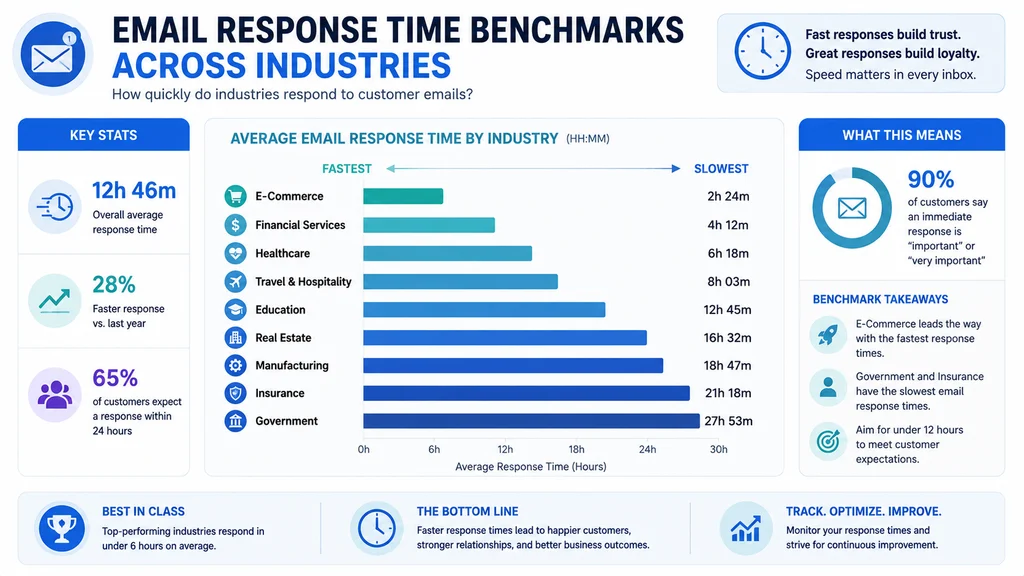
The best average email response time strategies balance speed with quality. The overall average is 3 hours 50 minutes during work hours, with industry norms ranging from 3 hours to 7.5 hours . Top alternatives: email reply speed benchmarks, professional response time standards, customer service reply metrics, sales email responsiveness targets, and inbox management productivity goals.
You’ve just sent an important email. Your cursor hovers over the sent folder, refreshing every few seconds. Minutes pass. Hours. Maybe even days. The silence is deafening.
We’ve all been there on both sides of the equation. Whether you’re waiting for a client to approve a proposal, a colleague to answer a question, or a support team to fix your issue, email response time sends a message louder than words. It tells people whether you value their time, their business, and their relationship.
The average email response time across all industries hovers around 3 hours and 50 minutes during work hours . But here’s the thing, that’s just the average. Some industries respond in under 2 hours, while others take half a day . The question isn’t just what’s normal, it’s what’s right for your business, your customers, and your professional relationships.
Professional Response Standards
1. Never exceed 24 hours for any business email
Example: Use this as your absolute maximum response time rule.
Meaning: Most professionals expect replies within 12 to 24 hours, and exceeding that damages relationships .
2. Under 6 hours for customer emails
Example: Set this as your standard customer service target.
Meaning: Only 36% of companies meet the 6-hour expectation, giving fast responders a competitive edge .
3. Under 1 hour for hot sales leads
Example: Use this for new inquiries and prospect outreach.
Meaning: Your close rate increases 700% when you respond within 1 hour .
4. Under 5 minutes for web form leads
Example: Apply this to high-intent inbound inquiries.
Meaning: Your chances of qualifying a lead are 21 times higher within 5 minutes versus 30 minutes .
5. Same business day for internal colleagues
Example: Use this for team communications.
Meaning: 52% of professionals expect responses within 12 to 24 hours for internal emails .
6. 15 minutes or less for urgent customer issues
Example: Use this for production incidents or escalations.
Meaning: 60% of customers define immediate as 10 minutes or less .
7. Consider work hours only for fair measurement
Example: Don’t count responses sent outside business hours against your team.
Meaning: Response time should be measured during working hours only, as many teams don’t monitor email 24/7 .
8. Exclude weekends and holidays from benchmarks
Example: Use this for accurate industry comparison.
Meaning: Most response time benchmarks exclude weekends and holidays to reflect actual business hours .
9. Set SLA targets at 50% of your current average
Example: If your current response time is 12 hours, target 6 hours first.
Meaning: Incremental improvement beats aggressive targets that nobody meets .
10. Customers want immediate responses
Example: 90% expect an immediate response from businesses.
Meaning: Speed is the most important sign of good customer service according to customers .
11. First response matters more than resolution speed
Example: Acknowledging an email quickly reassures the sender.
Meaning: First response time (FRT) is the metric customers care about most .
12. Fast responders capture sales
Example: 35-50% of sales go to the first respondent.
Meaning: Being first to reply dramatically increases your chances of winning the business .
Industry-Specific Benchmarks
1. Marketing: 3 hours 33 minutes
Example: Use this to benchmark your marketing team’s responsiveness.
Meaning: Marketing teams average just over 3.5 hours, making them one of the fastest industries .
2. Real Estate: 3 hours 36 minutes
Example: Use this to set expectations for agent email replies.
Meaning: Real estate professionals reply faster than most to secure listings and leads .
3. Manufacturing: 3 hours 42 minutes
Example: Use this to compare industrial sector performance.
Meaning: Manufacturing responds quickly during work hours despite complex operations .
4. Software & Technology: 4 hours 8 minutes
Example: Use this for SaaS and tech company comparisons.
Meaning: Tech companies average just over 4 hours during work hours .
5. Hospitality & Travel: 3 hours 46 minutes
Example: Use this for booking and reservation inquiries.
Meaning: Travel and hospitality sectors rely on fast email responses to secure bookings .
6. Professional Services: 4 hours 2 minutes
Example: Use this for law, consulting, and accounting firms.
Meaning: Professional services reply within 4 hours despite complex client matters .
7. Finance & Insurance: 4 hours 33 minutes
Example: Use this for banking and insurance email benchmarks.
Meaning: Finance and insurance reply slower due to compliance review requirements .
8. Retail: 4 hours 59 minutes
Example: Use this for ecommerce and retail customer service.
Meaning: Retail averages about 5 hours, but top performers respond much faster .
9. Education: 5 hours 1 minute
Example: Use this for academic and educational institution comparisons.
Meaning: Education sector replies within about 5 hours during work hours .
10. Healthcare: 4 hours 45 minutes
Example: Use this for medical and healthcare email benchmarks.
Meaning: Healthcare averages just under 5 hours, but this excludes clinical schedules and compliance review .
11. IT & Data Services: 4 hours 19 minutes
Example: Use this for IT service provider comparisons.
Meaning: IT services reply in just over 4 hours, improved by 2 hours 28 minutes year-over-year .
12. Overall work hours average: 3 hours 50 minutes
Example: Use this as your baseline for general comparisons.
Meaning: The average professional replies in about 3 hours 50 minutes during work hours .
Role-Based Targets
1. SDRs and inbound sales: under 5 minutes
Example: Use this for new lead follow-up.
Meaning: Speed decides conversion, and the fastest responders capture 35-50% of sales .
2. Account executives: under 1 hour during active deals
Example: Use this while a deal is in motion.
Meaning: When a deal is active, responsiveness signals commitment and keeps momentum .
3. Customer success managers: within a few hours
Example: Use this for existing client relationships.
Meaning: Faster for at-risk accounts, standard for routine check-ins .
4. Support agents: under 1 hour for standard tickets
Example: Use this for general customer support inquiries.
Meaning: 88% of customers expect a reply within 60 minutes .
5. Support agents: under 15 minutes for urgent issues
Example: Use this for production incidents and escalations.
Meaning: High-priority issues need immediate acknowledgment .
6. Executive level: 24-48 hours
Example: Use this for C-suite email communications.
Meaning: Executive responses can take longer due to high volume and competing priorities .
7. Internal communications: 12-24 hours
Example: Use this for colleague and team emails.
Meaning: 52% of professionals expect responses within 12-24 hours for internal email .
8. Customer service FRT: 1-6 hours average
Example: Use this depending on your industry and SLA.
Meaning: Customer service response times vary by industry and urgency level .
9. Team leaders: under 2 hours for direct reports
Example: Use this for managing team communications.
Meaning: Team members expect faster responses from their managers .
10. On-call engineers: under 30 minutes for alerts
Example: Use this for production issues and system incidents.
Meaning: Technical alerts require immediate acknowledgment .
11. Client-facing roles: same business day minimum
Example: Use this for all external client communications.
Meaning: Clients expect acknowledgment within the same business day .
12. Sales teams: under 1 hour for all inquiries
Example: Use this as your general sales response rule.
Meaning: Speed in sales correlates directly with conversion rates .
Measurement and Tracking
1. Calculate average: sum of reply times divided by number of replies
Example: Use this formula for your baseline measurement.
Meaning: If five replies took 1, 2, 2, 3, and 2 hours, the average is 10 divided by 5, or 2 hours .
2. Measure first response time (FRT) separately
Example: Track the time to first human reply, not the full resolution.
Meaning: FRT is the key metric customers care about most .
3. Track median response time
Example: Averages can be skewed by outliers.
Meaning: The median is often much faster than the mean, around 1.78 hours in one large study .
4. Exclude auto-replies and out-of-office messages
Example: Don’t count automated responses in your average.
Meaning: Auto-replies make your numbers look better than reality .
5. Measure by day of week
Example: Identify your slowest and fastest days.
Meaning: Mondays are typically slowest due to weekend backlog .
6. Measure by time of day
Example: Identify peak email volume periods.
Meaning: Most teams receive heaviest volume on Monday mornings .
7. Track next response time alongside FRT
Example: Measure follow-up reply speed too.
Meaning: Next response time should be within 2x of your FRT target .
8. Monitor SLA compliance rate
Example: Track percentage of emails meeting your service level agreements.
Meaning: Target 90-95% SLA compliance .
9. Review data weekly
Example: Build a consistent review cadence.
Meaning: Weekly reviews drive improvement .
10. Exclude weekends and holidays
Example: Only count work hours for industry comparisons.
Meaning: Industry benchmarks typically exclude weekends .
11. Use automated tracking tools
Example: Manual tracking breaks down fast.
Meaning: Email analytics tools automate measurement .
12. Set tiered targets for different email types
Example: Urgent emails have faster SLAs than informational ones.
Meaning: A single target for all emails doesn’t work .
Improvement Strategies
1. Batch email processing 3 times daily
Example: Check email at 10am, 2pm, and 4pm.
Meaning: Batching reduces interruptions and improves focus, saving about 20% of time .
2. Close your inbox between batches
Example: Turn off notifications and hide the badge count.
Meaning: Closing the inbox between batches improves first-response time because each batch runs with full focus .
3. Build a response template library
Example: Create templates for the top 20 inquiry types.
Meaning: Templates cut handling time by 40-60% without sacrificing personalization .
4. Automate triage and routing
Example: Use rules to send emails to the right agent instantly.
Meaning: Manual triage adds 15-30 minutes to every email .
5. Set real-time alerts for aging emails
Example: Get notified when emails approach their SLA deadline.
Meaning: Visibility drives urgency .
6. Use acknowledgement autoresponders
Example: Send auto-reply during high volume windows.
Meaning: Quick acknowledgment sets expectations while you craft a full response .
7. Staff to your volume patterns
Example: Align schedule with peak email times.
Meaning: Match staffing to your busiest periods .
8. Establish async communication norms
Example: Define when synchronous response is required.
Meaning: Not every email needs an immediate reply .
9. Use snooze for follow-up management
Example: Remove “not now” emails from your inbox until the right time.
Meaning: Snooze prevents “not now” messages from cluttering your active inbox .
10. Automate decision-required message handling
Example: Ask senders to state deadlines in the first sentence.
Meaning: This helps prioritize and route messages effectively .
11. Use smart routing to move messages to the right queue
Example: Route by sender or tag to skip manual triage.
Meaning: Tag-based or sender-based routing is usually enough .
12. Implement escalation triggers at 75% of SLA
Example: Notify managers when an email approaches its deadline.
Meaning: Teams reduce SLA breaches by 35% just by implementing escalation alerts .
FAQ
What is average email response time?
Average email response time is the mean time between receiving an email and sending a reply. The overall average is 3 hours 50 minutes during work hours, or about 11 hours including evenings and weekends .
Why does email response time matter?
Response time signals care and respect. Fast responses improve customer satisfaction, increase sales conversion, and strengthen professional relationships. Companies that respond first get 35-50% of sales .
What’s a normal email response time by industry?
Marketing averages 3h 33m, Real Estate 3h 36m, Healthcare 4h 45m, and Education 5h 1m . The gap between fastest and slowest industries is over 4 hours .
Should I reply to emails immediately?
Not necessarily. Batch processing 3 times daily is more productive than constant monitoring. You can save about 20% of time by checking email at set intervals .
What should I do if my response time is too slow?
Start by measuring your baseline, then implement batch processing, templates, and automated routing. Set realistic improvement targets at 50% of your current average .
Conclusion
Your average email response time is more than just a number. It’s a signal to every person who contacts you, telling them whether you respect their time, their business, and their relationship with you. In a world where 90% of customers expect an immediate response, being fast isn’t just nice, it’s necessary .
The good news is that improvement is achievable. Batch processing, templates, and smart automation can dramatically cut your response time without burning out your team . Start by measuring your current average, set realistic tiered targets, and implement one change at a time.
Remember, speed without quality doesn’t help anyone. The goal isn’t just to reply fast, it’s to reply well. When you balance speed with thoughtful, complete responses, you build trust, win business, and strengthen every professional relationship you have.






7 thoughts on “100+ Best Average Email Response Time Strategies for Professional Success For 2026”